Cancelling Zoom — or downgrading to free — starts a countdown on your cloud recordings: Zoom gives you 30 days, then they're gone permanently. You clicked "cancel," or you're about to, and now you're wondering what happens to three years of client recordings. Here's the short answer, then the details.
The details depend on which button you pressed.
If you cancel Zoom entirely
When you cancel a paid Zoom subscription, your cloud recordings are moved to trash and remain recoverable for up to 30 days. After that window closes, they're gone permanently — no extension, no second chance.
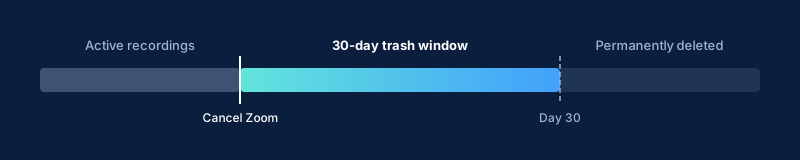
One nuance: this trash recovery window depends on your account's trash feature being enabled. If it's been disabled by an admin, recordings deleted on cancellation may not be individually recoverable via that route.
Thirty days sounds like enough time. But "recovering" them means downloading every file individually through Zoom's web portal — there is no bulk video export. If you have months of sessions, that's hours of clicking under a deadline, done while also migrating off the platform.
If you downgrade to free: you lose cloud recordings
Downgrading means losing cloud recordings entirely. Zoom's free plan doesn't include cloud recording — local only — so the moment your paid plan lapses, you can't make new cloud recordings at all.
Your existing recordings are set to be deleted after 30 days. But the recovery path is different from cancellation: Zoom's documentation for this scenario describes getting them back as resubscribing to a paid plan within that window — not downloading them from a trash tab. You'd need to reactivate a paid plan, download what you need, and then cancel again. Another deadline, another scramble.
The grace period is not a backup
The 30-day window is a recovery mechanism — designed for "I deleted that by mistake, get it back now." It isn't a migration window or an archive suited for "I need that client session from 18 months ago."
If your recordings are client notes, course materials, or anything with long-term value, Zoom's grace period offers no real protection — and the way you recover within it depends on how the recordings left. Cancelling outright moves them to Trash, the same 30-day Trash window you get when you delete a recording on purpose; downgrading to free instead starts its own 30-day clock that you reopen by resubscribing to a paid plan, not by restoring from a Trash tab (as the downgrade section above spells out). Either way the countdown is short and the recovery is manual. (For the full picture of how recordings can quietly disappear from Zoom cloud, see What Disappears From Zoom Cloud, and When.)
Two paths after cancellation
When someone realises their recordings are at risk, they end up in one of two situations.
The scramble. Racing to download everything before the window closes. Dozens or hundreds of recordings, each downloaded individually — there's no bulk video export from Zoom. Miss the deadline and those recordings are gone.
The non-event. Your recordings were already in Google Drive, backed up automatically each time a session finished. Cancellation is a billing change, not a data crisis.
The difference isn't what you did when you decided to cancel — it's what you did months earlier. If you're reading this before cancelling, you still have time to make it a non-event.
By the time you decide to cancel, it's too late to plan
Cancellations rarely happen on a schedule. A price increase, a better alternative, a change in how you work — the decision moves fast. Backing up your Zoom recordings to Google Drive now means any future Zoom decision is a billing change, not a deadline. Drive doesn't auto-delete, doesn't expire, and the long-term math on storage strongly favours it anyway. The rest of the Zoom storage & retention guides cover the neighbouring ways recordings slip away — hitting a full storage pool, or an admin retention policy clearing them out from under you.
How RecordFlow fits
RecordFlow backs up every Zoom cloud recording to the cloud storage you own — Google Drive, OneDrive, or Dropbox — automatically; recordings transfer directly from Zoom, and RecordFlow never stores a copy on its servers. Nothing to schedule, nothing to manually export. By the time you're weighing whether to cancel Zoom, your archive is already somewhere durable.
Back up before it's a crisis.
RecordFlow automatically saves every Zoom cloud recording to the cloud storage you own — Google Drive, OneDrive, or Dropbox — so cancellation, downgrading, or switching tools doesn't have to mean losing your recordings. Free during beta, no credit card required.