Three weeks after closing, a buyer's attorney asks exactly what was said on the call where their client agreed to waive the inspection contingency — and the recording is gone, aged out by Zoom's storage clock before anyone thought to save it. The coaching call you wanted to replay for the new hire starting Monday didn't survive either. What's still there from that stretch is filed under "Zoom Meeting" alongside three other calls from the same Tuesday, and nobody's sure which one it is. None of this is anyone's fault — it's just what happens when every recording sits wherever Zoom happened to put it, on a clock nobody's watching.
What's actually happening
A real estate team running calls through Zoom is really running two different kinds of recordings through the same pipe, and neither one is built to last.
Internal training and coaching calls — a scripts review, a role-play on handling objections, a weekly team huddle — are the thing a brokerage relies on to onboard the next agent without repeating the same conversation from scratch, for the same reason a replay deepens what any coaching session teaches: the specifics fade within days unless there's a recording to go back to. Client and deal calls — a buyer consultation, a listing walkthrough, a negotiation debrief — are worth keeping for a sharper reason than convenience: a dispute over what was disclosed, what a client agreed to, or what the agent said about a property's condition can surface months after closing, and a contemporaneous recording is a more reliable record of that conversation than anyone's memory of it. This isn't legal or insurance advice — what counts as adequate documentation, and for how long, is a call for the brokerage and its own E&O carrier, not a blog post (see how long you should keep your meeting recordings for the general framework) — but the incentive is the same either way: the record has to exist before the dispute does, not after.
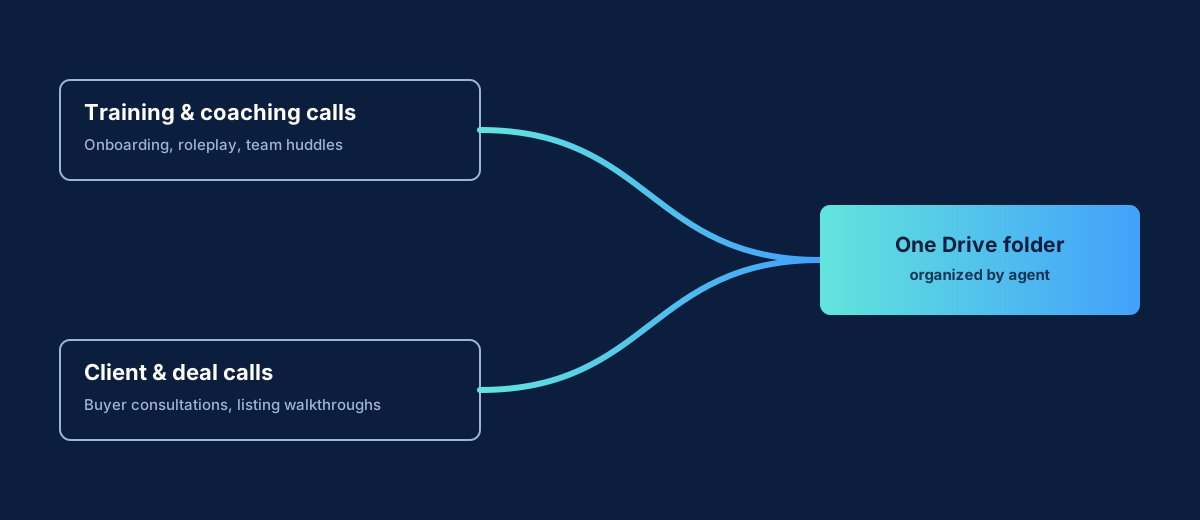
The client-call half of this is the same storage-and-findability problem our post on saving sales call recordings covers for sales teams generally, and real estate inherits it directly: most brokerages run every agent's calls through one shared Zoom account, with each agent hosting their own meetings as a Licensed user. When a call ends, the cloud recording lands under that agent's own account — not filed by client, listing address, or deal stage, just a meeting topic and a date. A broker can see every recording across the account from Zoom's account-wide recording view (Account Management → Recording and Transcript Management), but that's a list by host, not a library organized around a client relationship.
The storage itself is also under real pressure at exactly the wrong moments. Zoom's cloud recording storage is pooled across the whole account, not per agent, and a team running back-to-back showings and consultations during a hot listing season fills that pool faster than a quieter month would. Once it's full, Zoom can block new cloud recordings account-wide until someone frees space or the account buys more — which is exactly the week nobody has spare time to deal with it. Some accounts also run an auto-delete retention policy to manage that pressure, and that policy doesn't distinguish a coaching call worth keeping forever from a routine check-in — it ages both out on the same fixed schedule.
How a brokerage archives Zoom recordings for the whole team
- Get every agent's calls landing in one place automatically, the moment Zoom marks the recording ready — not whenever someone remembers to go download it before a retention policy catches up.
- Keep it organized by agent, not one flat pile. A sub-folder per agent means a team lead pulling up "Priya's calls from this listing cycle" isn't guessing which recording is which, whether it's a coaching session or a client call.
- Turn the transcript into something searchable. A clean, timestamped Google Doc transcript alongside the video means finding the exact line from a coaching call — or the exact commitment made on a client call — is a text search, not twenty minutes of scrubbing video.
- Name the meeting for what it actually is. "Objection Handling Roleplay" or "123 Maple St — Buyer Consultation" in the Zoom topic field is what makes a recording findable later; the archive tool downstream only has whatever name the meeting was given.
- If storage pressure is what's forcing cleanup decisions, don't let deletion outrun the backup. The safe way to auto-delete Zoom recordings confirms the archive copy exists first, so freeing up Zoom's storage during a busy week never costs the team a recording nobody backed up yet.
For a solo agent managing their own Zoom account, that's the individual RecordFlow setup: sign in with Zoom, connect a Drive folder, done in about 60 seconds — every call that agent hosts from then on lands in Drive automatically. For a brokerage or team on one shared Zoom account, RecordFlow's admin-managed app fits better — whoever runs the account installs once, connects a single Drive folder, and every enrolled agent's recordings land in their own sub-folder underneath it. No individual agent has to set anything up, recordings stay attributed to whoever hosted the call, and enrollment is admin-controlled per agent, so nobody's calls start archiving without the broker switching them on.
If a batch of training sessions repeats on a schedule — a weekly onboarding call, say — naming the topic with a shared prefix before a slash (Onboarding/Week 3) lets RecordFlow collect every session sharing that exact prefix into one folder automatically, instead of a new dated folder per week. It's off by default — see RecordFlow's documentation for how to turn it on — and it only affects future syncs, so a dated folder per call still works fine for one-off client consultations where that's exactly what you want.
How RecordFlow fits
RecordFlow doesn't touch a CRM, doesn't generate transaction paperwork, and isn't a coaching platform — it does one job: land every Zoom recording — video, audio, transcript, and chat log alike — into a Google Drive folder the team owns, automatically and within minutes of the call ending. Client and deal calls involve people outside the brokerage, so the same recording disclosure Zoom already prompts covers the archive too — RecordFlow doesn't change what participants were told, it just makes sure the file doesn't disappear afterward. Since a buyer consultation or a listing walkthrough can carry a client's financial details, it's worth being plain about custody too: a recording goes directly from Zoom to the team's own Drive folder, and RecordFlow never stores a copy of it on its own infrastructure. Once a coaching session or a client call is sitting in a Drive folder organized by agent, whatever the team already uses to onboard the next hire or pull up a past commitment is working from a file that isn't racing a storage clock.
Every call archived, findable months later when you need it.
Connect Zoom to a Google Drive folder your team already uses — every recorded call, coaching or client-facing, lands there within minutes, organized by agent and transcribed. Free during beta.